ASUS Bloatware List: What I’d Keep and Remove (2026)
An ASUS bloatware list sounds like it should be short. Then you open Installed apps on a ROG laptop and find a font made for a completely different laptop, plus a driver that doesn’t even show up there. So I went through every piece of ASUS software on my Zephyrus G16 and worked out what each one actually does.
Trimming the install cut ASUS’s background memory by about 55%, and most of that came from reinstalling Armoury Crate without its extras. The bigger surprise was what’s still sitting on the laptop for apps that aren’t even installed anymore. This works whether you just unboxed an ASUS laptop or you’ve had yours for a year. I’ll go through what each ASUS app does, which ones I’d keep and how to remove the rest down below.
After I went through every ASUS app on my G16 and trimmed the install:
- Background memory: Went from about 586 MB to 263 MB with every ASUS window closed
- GlideX: 4 services kept running, about 16 MB, with no GlideX app installed
- System Control Interface: Turned out to be the 1 piece G-Helper needs too
- Leftovers: Firewall rules for MyASUS and GlideX stayed behind after both apps were gone
- Zephyrus G16 (GA605WI)
- Ryzen AI 9 HX 370
- RTX 4070 Laptop
- Windows 11 Home 26H2
- Armoury Crate 6.7.6.0
Build 26300 · 32 GB RAM · MyASUS not installed
What Counts as ASUS Bloatware?
For this ASUS bloatware list, it’s anything ASUS put on the laptop that isn’t a driver your hardware needs to work. Drivers are the small pieces of software that let Windows talk to the touchpad, the keyboard’s Fn keys and the fans, and those stay. The rest are apps and background services, and most of them start every time you boot whether you ever open them or not.
If you’re specifically wondering how heavy Armoury Crate is on its own, I counted every one of its processes in is Armoury Crate bloatware, so this post covers everything else ASUS installs alongside it.
The ASUS Bloatware List on My G16
I put every ASUS app and component on my laptop into the ASUS bloatware list down below, with what it used in the background and what I’d do with it. Memory is private memory with every ASUS window closed.
| ASUS app | What it used on my G16 | Keep or remove |
|---|---|---|
| Armoury Crate + Armoury Crate Service + ROG Live Service + ASUS Update Helper | About 166 MB in the background, plus about 240 MB when the app is open | Optional. Keep it if you use it, and if you switched to G-Helper, use ASUS’s uninstall tool |
| ASUS System Control Interface v3 (a driver, not in Installed apps) | About 30 MB to 72 MB across 9 processes | Keep. G-Helper needs it too, and 5 of its services can be stopped |
| AsusPTPService (ASUS Precision Touchpad) | Not measured on its own | Keep, it’s the touchpad driver’s service |
| GlideX Service Installer | About 16 MB across 4 services | Remove if you don’t use GlideX. Mine ran with no GlideX app installed |
| ASUS Smart Display Control | About 3 MB | Keep for Panel Power Saver, remove if you use G-Helper |
| AI Noise Cancelation Audio Software | No background process | Optional, it’s the microphone noise filter |
| AniMeVisionFont_STRIX_SCAR | No background process | A font for the AniMe Vision display on a Strix Scar, which a G16 doesn’t have |
| ASUS Hotplug Controller and ASUS Monitor Control | Not measured on their own | No description from ASUS, so I left both installed |
2 of those are worth a closer look. GlideX had 4 services running all day with nothing to serve, since the GlideX app itself isn’t on my laptop, and I went through that one in its own post on ASUS GlideX. The AniMe Vision font is for the dot-matrix lid display on the ROG Strix Scar, and my G16 has Slash Lighting instead, so it’s an install for hardware this laptop doesn’t have. I haven’t uninstalled the font myself, but it doesn’t run anything in the background either way.
What ASUS Bloatware Can I Remove?
Going by what I tested, this is how I’d split it. The safe-to-remove group is the stuff that only matters if you use the feature it’s for:
- GlideX Service Installer if you don’t link your phone or a second screen through GlideX.
- AI Noise Cancelation Audio Software if you don’t use ASUS’s microphone noise filter in calls.
- AniMeVisionFont_STRIX_SCAR on any laptop without an AniMe Vision display.
- Armoury Crate and the pieces that come with it if you’ve switched to G-Helper, using ASUS’s own uninstall tool, which I tested in uninstall Armoury Crate.
- ASUS Smart Display Control if you use G-Helper, since it fights G-Helper over the refresh rate, which I went through in ASUS Smart Display Control.
And the 2 I’d leave alone are ASUS System Control Interface and AsusPTPService. The first is the layer that handles things like the Fn keys, and the G-Helper wiki lists it as a requirement, which I tested in ASUS System Control Interface. The second is the touchpad’s service.
How to Remove ASUS Bloatware
Everything on the list except Armoury Crate and the System Control Interface comes off the normal Windows way:
- Open Settings > Apps > Installed apps.
- Type ASUS in Search apps (#1 in the screenshot below). Some ASUS apps don’t have ASUS in the name, so search GlideX and AniMe too.
- Click the three dots next to the app (#2) and click Uninstall.
- Click Uninstall again to confirm, then Yes if Windows asks for permission.
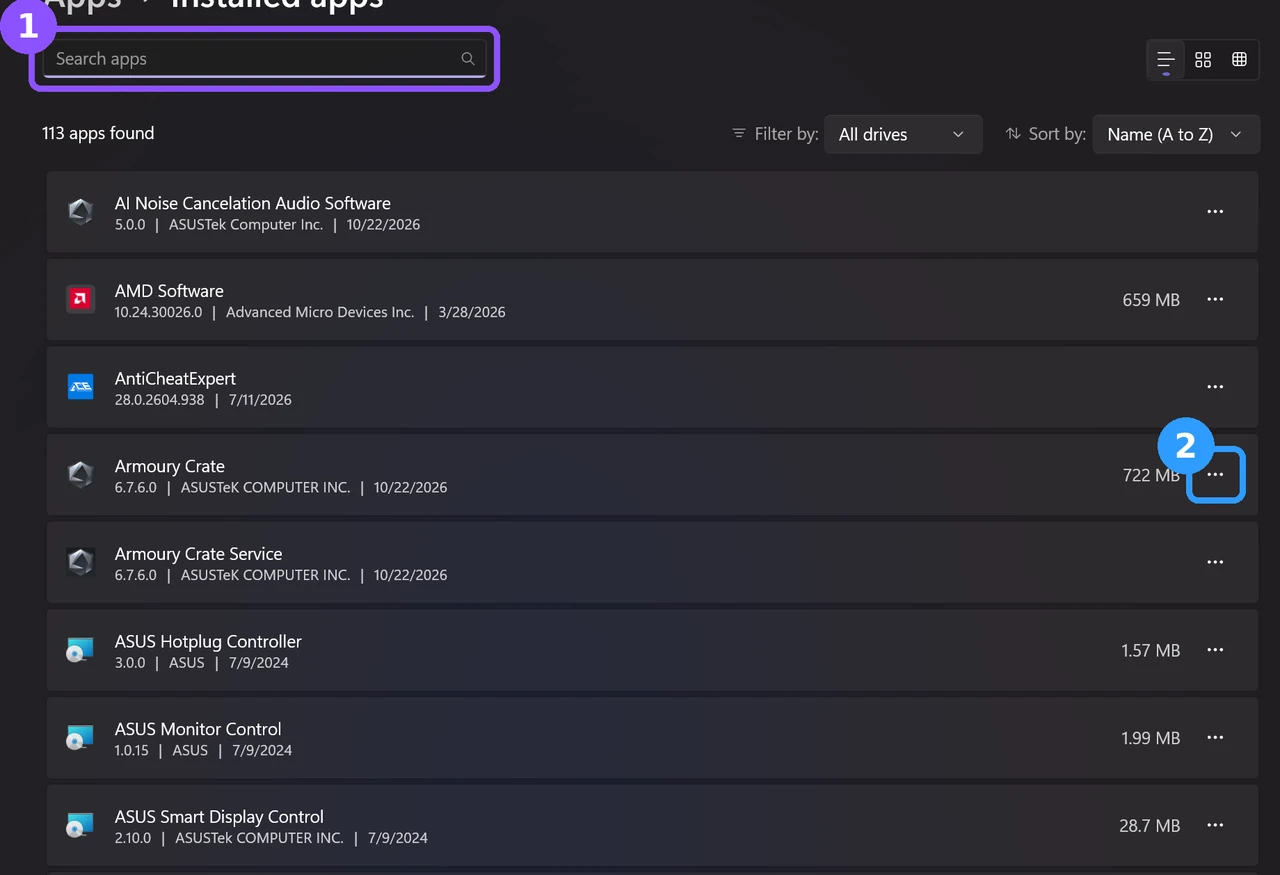
For Armoury Crate, use ASUS’s Armoury Crate Uninstall Tool instead of this list, which is the method ASUS’s own Armoury Crate FAQ points you to. The System Control Interface isn’t in Installed apps at all since it’s a driver, which is another reason to leave it.
My Factory Install vs After Trimming
For the before and after, I ran the same scan of every ASUS process, service, scheduled task and folder on the factory install, then again after reinstalling Armoury Crate without its optional extras and restarting. I ran 1 scan each, with every ASUS window closed both times, and sorted the results into the table down below.
| With every ASUS window closed | Factory install Stock | Trimmed |
|---|---|---|
| ASUS processes running | 33 | 21 −12 |
| Their memory (MB) | 586 | 263 −55.1% |
| ASUS services (running) | 19 (17) | 18 (15) −1 |
| Entries in Installed apps | 23 | 11 −12 |
| ASUS scheduled tasks | 14 | 14 0 |
| Files in the ASUS folders (MB) | about 815 | about 321 −60.6% |
Most of that drop came from Armoury Crate’s add-ons. The factory install was running 4 copies of a helper called asus_framework, a lighting service and an OLED Care helper, and all of those were gone after the lean reinstall, which I walked through step by step in Armoury Crate download. The rest of the ASUS software barely moved, since things like GlideX and the System Control Interface weren’t touched.
The scheduled task count didn’t change at all, partly because 4 of them still point to Armoury Crate files from the old install. One of them, P508PowerAgent_sdk, is a helper for an ROG Strix Carry mouse, which wasn’t even plugged in. None of them were running anything I could see, but they show how much ASUS leaves lying around.
The ASUS Leftovers You Can’t See in Installed Apps
MyASUS hasn’t been on my laptop since February, and the GlideX app isn’t installed either, but Windows Defender Firewall still had rules for both of them, including GlideX version 4.1.2.0. On top of that, the GlideX services and ASUS Switch had inbound firewall rules allowing connections on both private and public networks.
None of the GlideX services were listening for connections when I checked, so I’m not calling it a security hole. It’s just more than any ASUS bloatware list built from Installed apps would show you. To see your own, press Windows + R, type wf.msc, press Enter to open Windows Defender Firewall with Advanced Security, click Inbound Rules, and sort by Name to find the ASUS and GlideX entries.
ASUS Bloatware List FAQ
Does removing ASUS bloatware make the laptop faster?
Not in any way I could measure at idle. Every ASUS service I checked sat at basically 0% CPU, and the memory savings, about 323 MB, are about 1% of my 32 GB. On a 16 GB laptop with a lot of browser tabs open, it’s a bit more meaningful.
Is MyASUS bloatware?
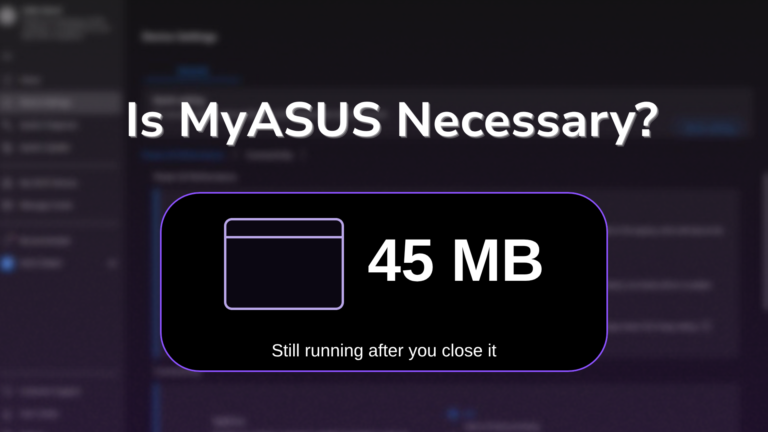
MyASUS wasn’t on my G16 when I made this list, so I put it back on separately to test it. After I opened it once and closed it, about 45 MB kept running in the background, and its one hardware setting, the charge limit, is already in Armoury Crate and G-Helper. I went through the rest in is MyASUS necessary. Also, 2 of the services the System Control Interface installs, ASUS System Analysis and ASUS System Diagnosis, are described by ASUS as diagnostic services, and they were running even without MyASUS installed.
Will Windows Update put ASUS bloatware back?
It can bring back drivers like the System Control Interface, since ASUS ships those through Windows Update. I haven’t seen it reinstall apps like GlideX on my laptop, but I didn’t track that over a long period.
Which ASUS bloatware should I remove first?
GlideX, if you don’t use it, since it was the one running the most background services for nothing on my laptop. For the settings worth changing on whatever you keep, check out my best Armoury Crate settings.
If your ASUS laptop has an app on it that isn’t on my ASUS bloatware list, drop the name and your model in the comments, and I’ll look into what it does.