

Sleep vs Hibernate Laptop: I Measured All 3 Overnight
Most sleep vs hibernate laptop advice says hibernate is the battery saver and shutting down is the slow, annoying option. I measured both on my ROG Zephyrus G16, plus plain sleep, and only half of that held up. Hibernate did save battery, but shut down saved just as much and came back 9 seconds faster. Below are the battery and wake-up numbers for each one, and when I actually use them.
After I measured all 3 on battery, sleep was the only one that really drained, and shut down came back faster than hibernate:
- Sleep: About 2.9 W, roughly 4% of the battery in an hour, back in about 3 s
- Hibernate: About 0.10 W, about 1% over 7.7 h, 30 s to the sign-in screen
- Shut down: About 0.09 W, about 1% over 9.45 h, 21 s to the sign-in screen
- Zephyrus G16 (GA605WI)
- Ryzen AI 9 HX 370
- RTX 4070 Laptop
- Windows 11 Home 26H2
- powercfg /sleepstudy
Modern Standby (S0) · Fast Startup on · off the charger
Day to day, I shut my laptop down at night when I go to sleep, and during the day I just close the lid between classes. I used to have it set to hibernate whenever I closed the lid, but having to wait for it to boot back up every time I opened my laptop during the day annoyed me more than the battery it saved, so I switched it back to sleep. I wanted actual numbers on whether that was the right call.
What sleep, hibernate and shut down actually do
Sleep keeps your laptop’s memory powered, so everything you had open is ready the second you open the lid, but the laptop is still technically on and still using some battery. Hibernate copies everything you had open onto your drive and then powers off completely, so it uses almost nothing, and you come back to the same apps and tabs. On my G16 that copy lives in a file called C:\hiberfil.sys, and it was about 13.4 GB. If you’ve ever opened your battery report and wondered why a whole night shows up as a single Suspended row, that’s usually hibernate, and I broke down what every row and label in the Windows battery report means using my own G16’s report.
Shut down closes all your apps, but on most Windows laptops it isn’t a full cold boot either, because a setting called Fast Startup (on by default, and on for mine) saves just the core of Windows to the drive so the next start is quicker. Microsoft’s own shut down, sleep or hibernate page says hibernate uses less power than sleep and brings you back to where you left off, just not as fast as sleep, which is exactly what I wanted to put numbers on.
Sleep vs hibernate laptop battery drain
I ran each one off the charger and pulled the numbers from Windows’ own battery logs afterward, which count battery in mWh (thousandths of a watt-hour), so nothing here is an estimate from a percentage on the taskbar. You can see my sleep vs hibernate laptop results for all 3 in the table below, compared against shut down.
| State | Average drain (W) | Battery used | Back in (s) |
|---|---|---|---|
| Shut down Baseline | 0.09 | 813 mWh over 9.45 h (about 1%) | 21 |
| Hibernate | 0.10 +0.01 W | 764 mWh over 7.7 h (about 1%) | 30 +9 s |
| Sleep | 2.9 +2.81 W | 3,075 mWh over about 1 h (about 4%) | 3 −18 s |
Sleep used way more than the other 2, pulling about 29 times the power hibernate did. Just 1 hour asleep used about 4 times the battery that a whole 7.7 hour night of hibernate did (3,075 mWh vs 764 mWh). Hibernate and shut down, on the other hand, came out basically tied at about 1% for a whole night, and the 0.01 W gap between them is smaller than the battery gauge’s own wobble (the morning after my sleep night, the reading actually went up by 446 mWh when the laptop woke from hibernate), so I wouldn’t call either one the winner on battery. The back-in times are from the moment I opened the lid or pressed the power button, and sleep’s 3 seconds already includes unlocking, since Windows Hello face sign-in was instant.
You can see the hibernate night for yourself in my battery report below. It logged the laptop as Suspended at 2:47 AM with 60,661 mWh left, and the first reading after I woke it at 10:29 AM was 59,897 mWh (both in the orange boxes), which is the whole 764 mWh. Windows labels that first reading after waking as Connected standby, so don’t let that throw you off if you check your own report.

Why sleep drains on newer laptops
Most of that sleep vs hibernate laptop gap comes down to how newer laptops sleep. Older laptops had a deep sleep mode called S3 that cut almost everything off, while most newer laptops, mine included, use Modern Standby instead, which keeps the laptop in a very low power “on” state a lot like a phone with its screen off. You can check which one yours has by opening Command Prompt and running this:
powercfg /a
On my G16 the only sleep available was Standby (S0 Low Power Idle) (in the orange box), and S3 was listed as not supported by the firmware, so that 2.9 W is simply what Modern Standby costs on this laptop. Microsoft’s page also says PCs with InstantGo don’t have the hibernate option (InstantGo is what Microsoft used to call this always-on standby), but mine still listed Hibernate right under it, and it worked fine. If you want the technical side, Microsoft goes into how this standby works on its Modern Standby page.
My logs also showed that every night I left it asleep, the laptop switched itself to hibernate after about an hour, even though Windows’ own hibernate timer was set to never, so that came from ASUS’s software and not from Windows. If your ASUS laptop is losing battery while it’s supposed to be off, I tracked that down separately in why my ASUS laptop’s battery drained when turned off.
How fast each one comes back
I timed each one with my phone from the moment I opened the lid or pressed the power button. Sleep came back in about 3 seconds, unlocked and ready, hibernate took 30 seconds to reach the sign-in screen, and a normal shut down took only 21 seconds to get to the same screen.
Shut down beat hibernate because of Fast Startup. Hibernate has to read back everything you had open from that big hibernate file, while Fast Startup only reloads the core of Windows and starts you fresh, so there’s simply less to load. If you’re only hibernating to get a faster start in the morning, a normal shut down is going to get you there quicker on a laptop like mine.
Is it better to sleep or hibernate a laptop?
I think the tabs staying open during hibernate is really nice in the times between parts of my day where I don’t want my battery to drain, but I know I need to continue working on something. So within my day I would choose hibernate to save battery, since we saw it has about the same drain as shut down, and then I shut down at night to get a nice clean boot up the next morning.
For overnight, I would tell a friend to just shut down their laptop, or put it on the charger so they don’t have to worry about the charge the next morning. Leaving it asleep overnight usually doesn’t go wrong, but I’ve noticed it does drain between uses. And closing your lid between classes is perfectly fine, just remember to watch your battery so your laptop doesn’t accidentally die in class (that happened to me a few times). If yours ever runs completely flat and then won’t power back on even with the charger in, the 40-second power button hold that brought my G16 back is the first thing to try, as long as you leave the 18-second black screen alone.
How to turn on hibernate in Windows 11
On my laptop Hibernate wasn’t in the Start menu’s power options at all, which makes it look like Windows 11 removed it. It’s still there, just hidden, and you can add it back in Control Panel:
- Open Control Panel > Hardware and Sound > Power Options and click Choose what the power buttons do.
- Click Change settings that are currently unavailable at the top (box 1), since the checkboxes stay grayed out until you do.
- Tick Hibernate under Shutdown settings (box 2).
- Click Save changes at the bottom of the window. Hibernate now shows up under Start > Power.
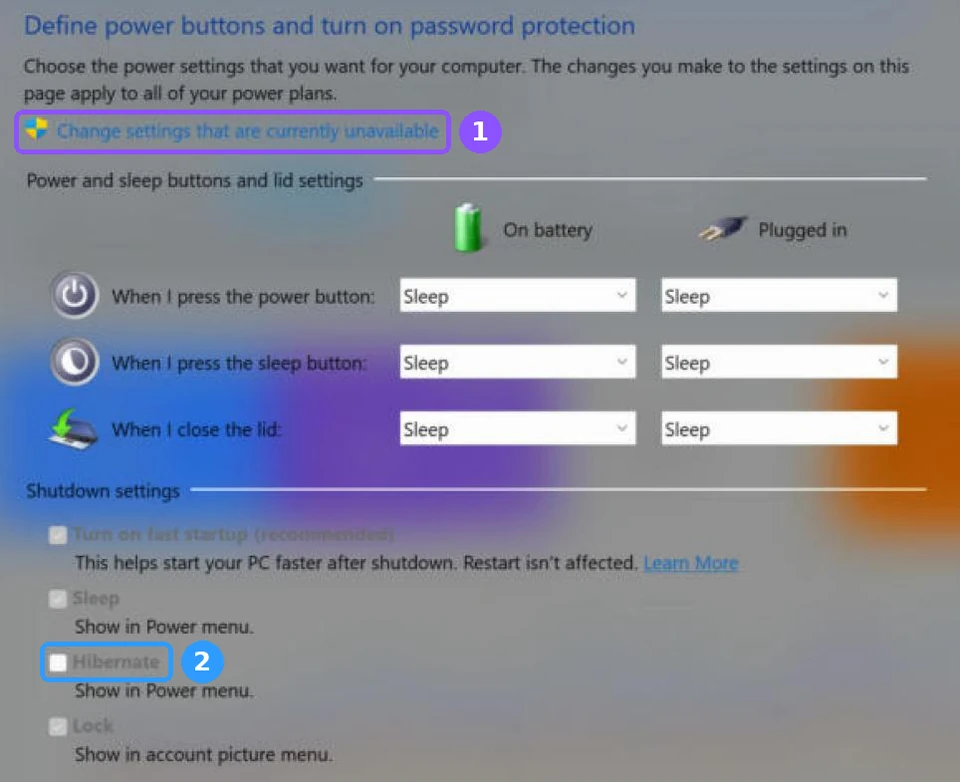
The same page also has the When I close the lid dropdowns, which is where I had hibernate set back when I tried it on lid close. If you just want to hibernate once without changing anything, this command works even when the Hibernate box isn’t ticked (it’s what I used for my overnight test):
shutdown /hMake sleep switch to hibernate automatically
If you like how instant sleep is but don’t want it draining all night, you can let Windows switch from sleep to hibernate after a while. Open Settings > System > Power & battery and expand Screen, sleep, & hibernate timeouts (the orange box below), then set how long it should sleep before it hibernates. Mine had sleep after 30 minutes on battery and Windows’ hibernate timer set to never, which is why the 1 hour switch I saw came from ASUS instead.

That ASUS switch is also why my laptop didn’t die on either night I left it asleep, so if you’re on a different brand and yours keeps waking up flat, setting this timer is going to be the quickest way to get that same safety net. Once it’s set, check the Recent usage table in your battery report after a night or 2, since it logs every sleep and hibernate with the battery level next to it.
FAQ
Is it okay to leave a laptop asleep overnight?
It’s fine as long as you watch the battery, but mine lost about 4% in the first hour before ASUS switched it to hibernate. At that rate, a full 8 hour night asleep off the charger would have used about a third of my battery, so if yours doesn’t switch on its own, plug it in or shut it down.
Does hibernate take up space on my drive?
Yes. The hibernate file on my G16, C:\hiberfil.sys, was about 13.4 GB, and it’s there as long as hibernate is available, even if you never use it.
Is hibernate still in Windows 11?
Yes. It’s just hidden from the Start menu by default. My G16 listed it as available in powercfg /a, and you can add it back with the steps above.
If your laptop sits on the charger most of the day, the bigger battery win is a charge limit, and mine has only lost about 0.5% more health in 2 months on the 80% limit. If you’re on battery all day like me, the browser setting that cut my YouTube drain by about 61% is worth more than any sleep setting. And if you time yours, drop your laptop model and how long it took to come back from hibernate vs a normal shut down in the comments, because I want to see if shut down wins on other laptops too.