
MyASUS vs Armoury Crate: Which Do You Need on a ROG Laptop? (2026)
MyASUS vs Armoury Crate is a confusing choice on a ROG laptop, because both come from ASUS, both show up in your Start menu and both have a battery charge limit in them. I put MyASUS back on my Zephyrus G16 next to Armoury Crate to see where they overlap, and MyASUS’s settings page only had 4 controls on it.
That turned out to be the key to the whole comparison, and G-Helper changes it again for anyone who’d rather run neither. Whether you’re trying to cut down on ASUS apps or just want to know which one you actually need, I’ll go through what each one does, what each one runs in the background and which mix makes sense down below.
After I ran MyASUS next to Armoury Crate on my G16:
- MyASUS: 4 settings, plus updates, diagnostics and warranty info
- Armoury Crate: Every performance, graphics, fan and lighting setting
- Overlap: Battery Care Mode is in both, and MyASUS links to Armoury Crate for the rest
- Background with apps closed: About 45 MB for MyASUS, about 155 MB for Armoury Crate’s own processes
- Zephyrus G16 (GA605WI)
- Ryzen AI 9 HX 370
- RTX 4070 Laptop
- Windows 11 Home 26H2
- MyASUS 4.0.77.0
- Armoury Crate 6.7.6.0
Build 26300 · ASUS System Control Interface 3.1.72.0
What MyASUS and Armoury Crate Each Do
In plain terms, MyASUS is ASUS’s support app and Armoury Crate is ASUS’s control panel for gaming laptops. ASUS’s own Armoury Crate vs MyASUS guide splits them the same way, with Armoury Crate for gaming machines and MyASUS for every ASUS laptop.
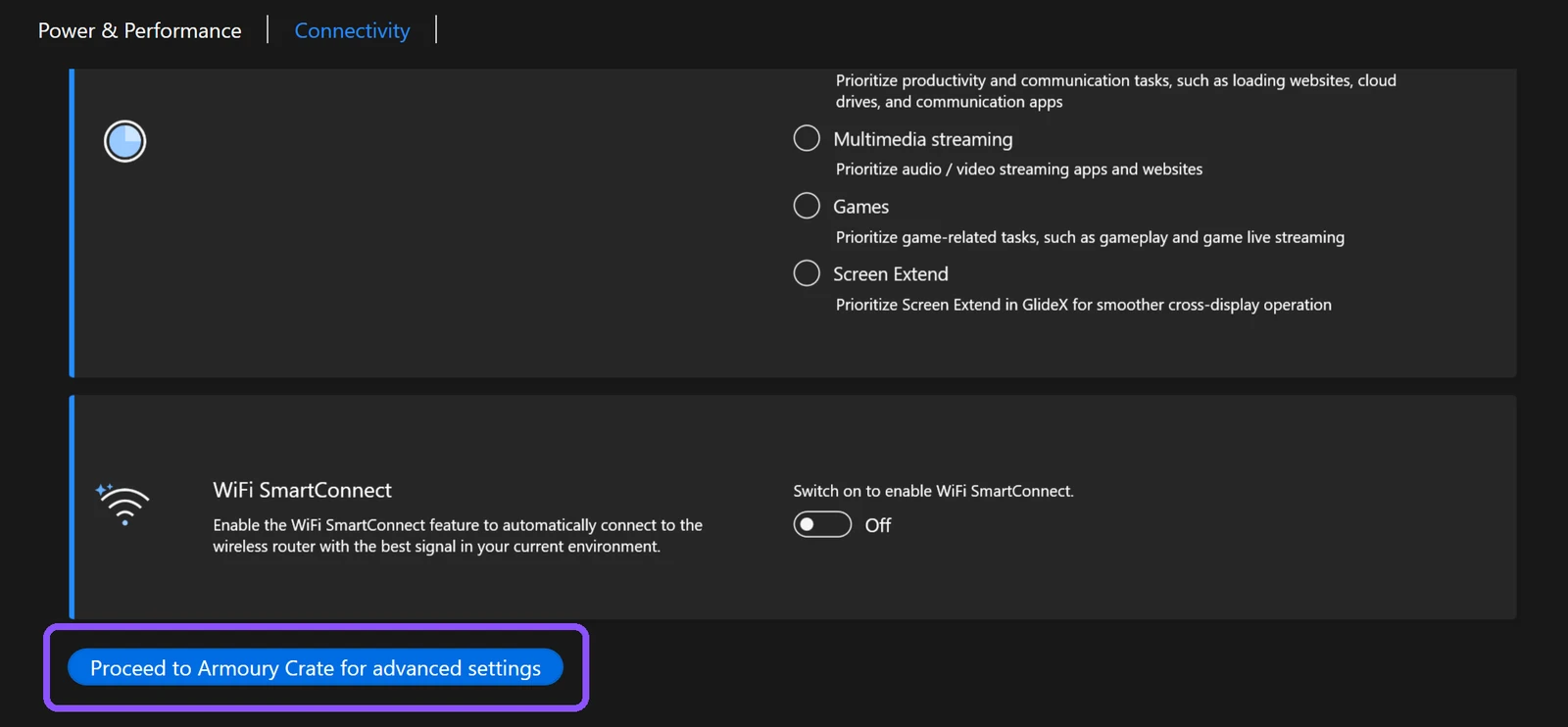
On my G16 that split was very literal. MyASUS’s Device Settings page had Battery Care Mode, Instant Full-Charge Mode, TaskFirst and WiFi SmartConnect, and then a Proceed to Armoury Crate for advanced settings button at the bottom. Everything else, from performance modes to fan speeds, lives in Armoury Crate.
MyASUS vs Armoury Crate Side by Side (Plus G-Helper)
I sorted what each app can do on a ROG laptop into the table down below. The MyASUS and Armoury Crate columns are from my G16 this week, and the G-Helper column is from when I ran it as my daily app.
| Feature | MyASUS | Armoury Crate | G-Helper |
|---|---|---|---|
| Battery charge limit | 80% on/off | Yes | Yes (slider) |
| Performance modes (Silent, Performance, Turbo) | No | Yes | Yes |
| GPU mode (Eco, Standard, Ultimate) | No | Yes | Yes |
| Fan curves | No | Yes | Yes |
| Keyboard and Slash lighting | No | Yes | Yes |
| Network priority (TaskFirst) | Yes | No | No |
| ASUS driver and firmware updates | Yes | Yes | No |
| Hardware diagnostics | Yes | No | No |
| Warranty and ASUS support | Yes | No | No |
| ASUS account prompts | Yes | Yes | No |
What Each One Runs in the Background
I measured private memory (the RAM a process keeps for itself) for each app’s own processes in the same session, with every window closed.
| App | Processes left running | Memory (MB) |
|---|---|---|
| MyASUS | BackgroundTaskUWP, AsusOSD | 45.3 |
| Armoury Crate | ArmouryCrate.Service, UserSessionHelper, ArmouryCrateControlInterface | 154.8 |
| G-Helper | 1 process (GHelper) | Not measured this session |
Neither number includes the ASUS System Control Interface services, which run whichever of these apps you pick, since that’s the driver all 3 use to reach the hardware. I went through those in my ASUS System Control Interface post, and the full Armoury Crate breakdown, 29 ASUS processes in total, is in is Armoury Crate bloatware.
MyASUS also uses a lot more while its window is open, with the main process at about 591 MB on the Home page, so the 45 MB is what you pay for having it installed and closed.
Do I Need MyASUS and Armoury Crate?
Do I need MyASUS and Armoury Crate both? On a ROG laptop, Armoury Crate is the one you’d miss, since it holds every setting that changes how the laptop performs. MyASUS adds 3 things Armoury Crate doesn’t have, which are ASUS’s System Diagnosis, warranty info and a System Update page that offered me an SSD firmware update.
The charge limit is where the 2 overlap. Both apps set the same Battery Care Mode, though MyASUS on my G16 only had an 80% on/off switch while Armoury Crate and G-Helper let you pick the limit. I didn’t test what happens if you set different values in each app, so I left that untested and only ever set it from 1 app at a time.
MyASUS or Armoury Crate for a ROG laptop
MyASUS or Armoury Crate, if you only keep one? On my G16, MyASUS on its own would leave you without performance modes, GPU modes, fan control and lighting, so it can’t replace Armoury Crate. Armoury Crate on its own leaves you without diagnostics and the warranty page, which you can get on ASUS’s support site instead.
Where G-Helper Fits In
G-Helper is a free, open-source app that controls the same hardware as Armoury Crate in 1 small process, and it’s what I ran daily for months. It covers the whole Armoury Crate column for performance, GPU modes, fans and lighting, but none of MyASUS’s support side and no ASUS updates. I compared it to Armoury Crate in detail in G-Helper vs Armoury Crate.
So the 3 realistic setups are Armoury Crate alone, Armoury Crate with MyASUS for updates and diagnostics, or G-Helper alone with ASUS’s support site for the rare driver update. MyASUS on its own isn’t really one of them on a ROG laptop.
If someone asked me which ASUS apps to keep, I’d tell them MyASUS for simple updates and care, and Armoury Crate for gaming and performance control. G-Helper is naturally the improvement in my eyes though, since it handles the whole Armoury Crate side in 1 small process.
MyASUS vs Armoury Crate FAQ
Is MyASUS better than Armoury Crate?
They don’t do the same job. MyASUS is better for support things like diagnostics and warranty, and Armoury Crate is the only one of the 2 with performance, fan and lighting controls on a ROG laptop.
Is Armoury Crate necessary on an ASUS laptop?
Not if you use G-Helper instead, since it controls the same hardware. Without either one you’d be stuck with whatever mode the laptop was last set to. If you do keep it, my best Armoury Crate settings covers the 5 worth changing.
Can I uninstall MyASUS and keep Armoury Crate?
Yes, they’re separate installs. I uninstalled MyASUS in 2.9 seconds and Armoury Crate stayed installed. I went through what MyASUS leaves behind in is MyASUS necessary.
If you run MyASUS and Armoury Crate together, tell me in the comments which one you actually open more, because I’m curious if anyone uses MyASUS for more than the warranty page.