
ASUS Laptop Battery Drains When Turned Off? 2 Nights Tested
If your ASUS laptop battery drains when turned off, the first thing to check is whether it was actually off, because on my Zephyrus G16 the power button and the lid were both set to put it to sleep. On mine, sleep was the whole problem, and once I really shut it down with Start > Power > Shut down, it lost about 1% over 9.5 hours.
Closing the lid the night before cost me 4 times that, and nearly all of it happened in the first hour. There’s also a hidden Armoury Crate setting that quietly limits how bad sleep can get, and a reason Fast Startup isn’t as off as it looks. Whether your battery is lower every morning or it drains on a laptop that sat in a bag for a week, I’ll go through what I measured and the settings that fix it down below.
After I shut my G16 down from the Start menu instead of closing the lid:
- Lid closed: Lost about 4.2% overnight, almost all of it in the first hour at about 3.1 W
- Shut down: Lost about 1% in 9.5 hours, roughly 0.09 W
- Power button: Was set to Sleep on battery and plugged in, same as the lid
- Fast Startup: Left on, and Armoury Crate’s service kept running straight through the shutdown
- Zephyrus G16 (GA605WI)
- Ryzen AI 9 HX 370
- RTX 4070 Laptop
- Windows 11 Home 26H2
- Armoury Crate 6.7.6.0
Build 26300 · Fast Startup on · charger and USB devices unplugged overnight
Is It Off, Asleep or Hibernating?
Windows has 3 ways to look “off”, and they drain the battery very differently. Sleep keeps the laptop running at a tiny power level so it can wake up instantly, hibernate saves everything to the SSD and cuts power almost completely, and shut down closes everything and turns the laptop off.
You can’t tell them apart by looking, since the screen is black and the keyboard is dark in all 3, so a laptop that’s been asleep in your bag for 2 days looks exactly like one that’s been shut down.
On top of that, newer laptops like mine don’t use the old-style sleep at all. They use what Microsoft calls Modern Standby, which works more like a phone, so the laptop is technically still on and can keep doing small things in the background. Running powercfg /a on my G16 listed Standby (S0 Low Power Idle) as the only sleep it supports, with the older S3 sleep marked as not supported by the firmware.
My ASUS Laptop Battery Drains When Turned Off Test
To see how much my ASUS laptop battery drains when turned off compared to asleep, I tested 2 nights on my G16 with the charger unplugged and nothing plugged into the USB ports. Night 1, I closed the lid like I normally do. Night 2, I shut it down from the Start menu with Fast Startup still on. The numbers come from Windows’ own battery report, which logs the battery’s stored energy every time the laptop changes state, and I sorted both nights into the table down below.
| Overnight | Hours | Battery used (mWh) | Battery % | Average power (W) |
|---|---|---|---|---|
| Lid closed (sleep, then hibernate) Baseline | 9.2 | 3,186 | about 4.2% | 0.35 |
| Shut down from the Start menu | 9.5 | 813 −74.5% | about 1.0% | 0.09 −75.1% |
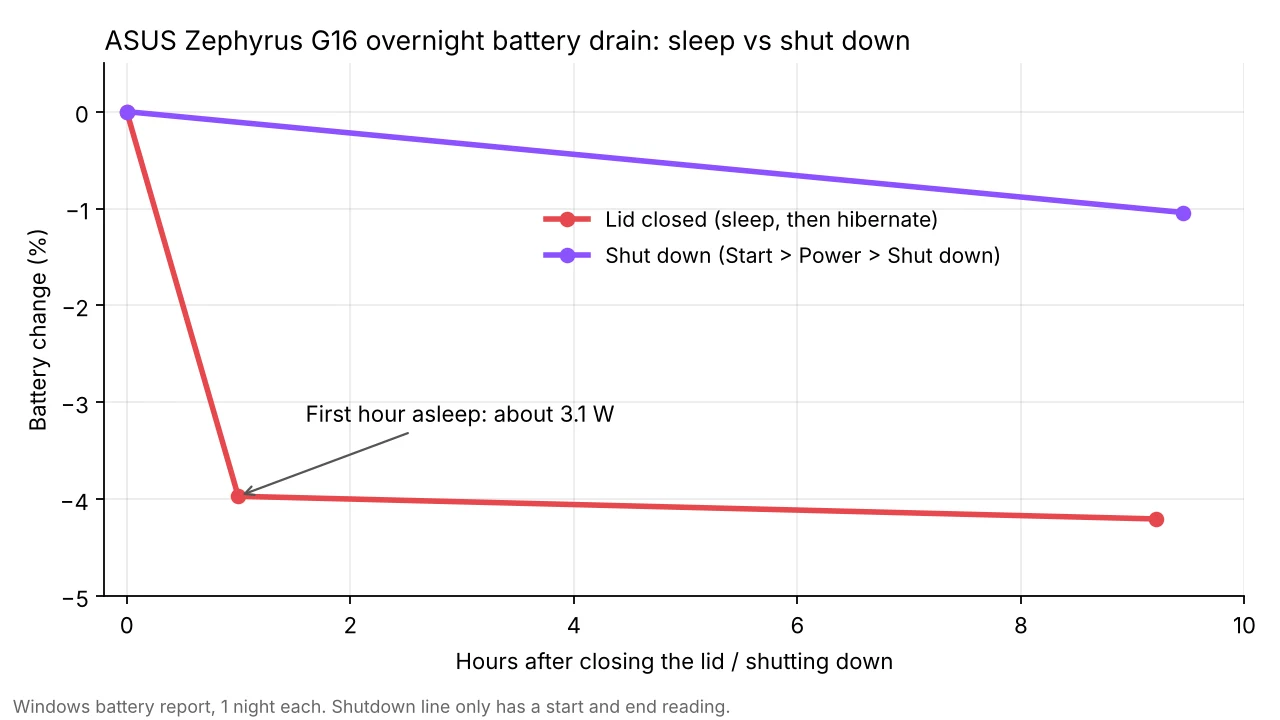
The chart above shows the weird part about night 1. The laptop burned about 3.1 W asleep for exactly 1 hour, dropping almost 4%, and then the drain basically stopped for the next 8 hours. The sleep report showed why, since Windows switched it from sleep to hibernate after that first hour, and hibernate only used about 112 mWh over the whole rest of the night.
Night 2’s 1% also includes about 40 seconds of booting back up, because the first battery reading after a shutdown only happens once Windows is running again. So the real drain while it was off was a bit lower than that. I only ran 1 night each, but a 4x gap between them is a lot bigger than the difference I’d expect from night to night.
Why Is My Laptop Battery Draining Even When Off?
On my laptop it came down to the power button. Open Control Panel > Hardware and Sound > Power Options > Choose what the power buttons do, and both When I press the power button and When I close the lid were set to Sleep, on battery and plugged in, which I boxed as #2 in the screenshot down below.

So if you press the power button to “turn it off” like most people do with a phone, you’re putting it to sleep. Mine sleeps at about 3 W lately, and if it didn’t hibernate after an hour, that would empty a full battery in around a day.
How fast my G16 drained in sleep over a week
Funny enough, sleep wasn’t always this bad on mine. Pulling every sleep session from the last week out of the sleep report, it ran at about 0.63 W on Oct 18, 0.90 W on Oct 19 and 1.10 W on the morning of Oct 21, and then every sleep since the afternoon of Oct 21 landed between 2.99 W and 3.53 W. My main suspect is the graphics mode, since the sleep report flagged audio and the SSD as the top things keeping it awake. I haven’t tested Standard vs Eco sleep yet, so I left that part untested for now.
The Hidden Armoury Crate Setting: Modern Standby Assistant
In Armoury Crate, click the laptop picture on Home to open System Settings, stay on System Configuration, and you’ll find a tile called Modern Standby Assistant, which none of the top results I checked even mention (boxed in the screenshot down below).
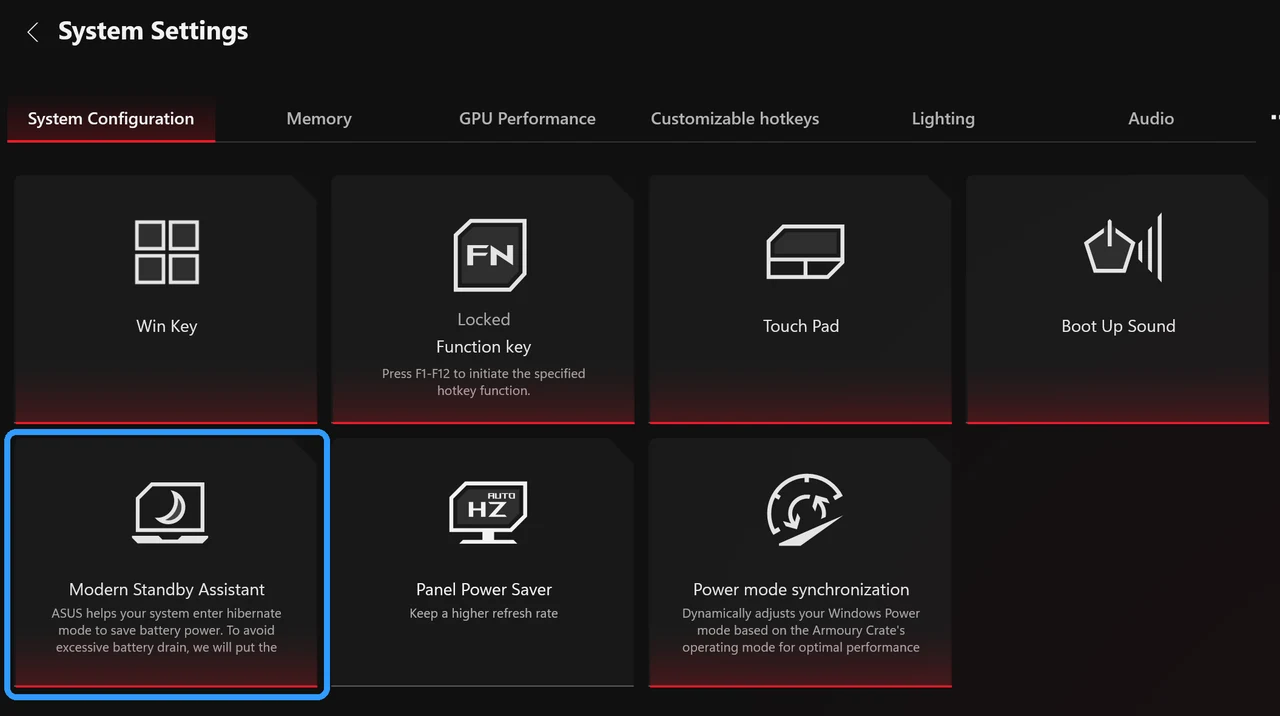
ASUS describes it as putting the system into hibernate if it uses too much power for too long while asleep, which is exactly what happened on my night 1. It was on for my test, shown by the red bar along the bottom of the tile. I didn’t turn it off to check whether ASUS or Windows’ own hibernate timer did the switching, but either way it’s the reason a 3 W sleep cost me 4% instead of most of the battery.
If you’ve uninstalled Armoury Crate, that setting goes with it, which is one more thing to keep in mind from my uninstall Armoury Crate testing.
Does Fast Startup Drain the Battery When It’s Off?
The top YouTube fix for this says to turn off Fast Startup, so I left it on for night 2 to see. My G16 still lost only about 1% overnight with it on, so Fast Startup wasn’t what was draining mine.
Here’s the catch though, Fast Startup does change what “shut down” means. Instead of closing everything, Windows saves its core to the SSD and reloads it at the next boot, kind of a half hibernate. I could see it on mine, since after shutting down at 3:18 AM and booting at 12:45 PM, the Armoury Crate Service still showed a start time of 2:44 PM the day before, so it never actually restarted. The startup log also listed the boot type as a Fast Startup boot. A Restart does a full restart either way, as the Power Options page itself says right under the Fast Startup checkbox.
I didn’t test a night with Fast Startup off, so I left that untested. If you want to try it, it’s the Turn on fast startup (recommended) checkbox on the same Power Options page as the button settings, after you click Change settings that are currently unavailable.
How to Stop the Battery Draining When Your ASUS Laptop Is Off
These are the fixes in the order I’d do them, using the numbers in the Power Options screenshot above:
- Shut down from Start > Power > Shut down when you’re putting it away for more than a day, which is how I got the 1% overnight result.
- Change what the buttons do. Open Control Panel > Hardware and Sound > Power Options > Choose what the power buttons do, click Change settings that are currently unavailable (1), set When I press the power button to Shut down or Hibernate (2), and click Save changes (4). I left mine on Sleep so I could test it as it came.
- Add Hibernate to the power menu. On the same page, check Hibernate under Shutdown settings (3), then click Save changes (4). It was unchecked on my G16.
- Check that Modern Standby Assistant is on in Armoury Crate under Home > System Settings > System Configuration.
- If it drains while truly shut down, unplug everything from the USB ports and try a night with Fast Startup off. A Zephyrus owner on Reddit also fixed it by turning off Fast Boot in the BIOS, which I didn’t try on mine.
How to Check What Your Laptop Did Overnight
If you think your ASUS laptop battery drains when turned off, you don’t need my bench setup to check, since Windows already logs it. Right-click Start, click Terminal (Admin), click Yes, then paste this and press Enter:
powercfg /sleepstudy /output "$env:USERPROFILE\Desktop\sleepstudy.html"Open sleepstudy.html from your desktop. Each sleep session gets its own row with how long it lasted and how much battery it used, and the session details list what kept the laptop awake. Microsoft’s SleepStudy guide explains every column if you want to dig in. For drain while it’s shut down, run powercfg /batteryreport and check the Recent usage table for the battery level right before the shutdown and right after the next boot.
ASUS Laptop Battery Drains When Turned Off FAQ
How much should a laptop battery drain when it’s shut down?
Very little. Mine lost about 1% in 9.5 hours shut down, and that includes the boot. Losing several percent a night usually means it was asleep, not off.
Does this happen on ASUS ROG laptops on Windows 11?
I tested on an ROG Zephyrus G16 running Windows 11 26H2. Any laptop using Modern Standby works the same way, so the sleep vs shut down difference isn’t an ASUS-only thing, though Modern Standby Assistant is.
Is it bad to close the lid instead of shutting down?
For a few hours, no. For a few days in a bag, it keeps using battery the whole time it’s asleep, and on mine that was 3 W until it switched to hibernate. If you mostly leave it on the charger instead, the setting worth looking at is a charge limit, which I tested in ASUS Battery Care Mode.
Why does my ASUS laptop battery drain while plugged in?
It’s a different problem, usually the charger being too small for what the laptop is doing. I tested it with 2 chargers in ASUS laptop battery draining while plugged in, and for battery life while you’re actually using it, check out my Armoury Crate battery life testing and the rest of my best Armoury Crate settings.
If your ASUS laptop battery drains when turned off even after a real shutdown, drop your model and how much it lost overnight in the comments, and tell me whether Fast Startup was on.