Does Windhawk Affect Performance? I Measured 11 Mods
Does Windhawk affect performance? Not in any way I could measure in games. Across 4 alternating Cyberpunk 2077 benchmark runs, my laptop averaged 153.59 FPS with Windhawk off and 153.26 FPS with all 11 of my mods on, a 0.2% gap that’s smaller than how much the benchmark moves between identical runs. On battery the gap was about half a watt at most, and Explorer used about 2 MB more with every mod loaded.
Everything here is off my ASUS ROG Zephyrus G16 (2024, Ryzen AI 9 HX 370, RTX 4070, 32 GB RAM, 240 Hz OLED) on Windows 11 25H2 build 26200, running Windhawk 1.7.3 and G-Helper 0.285.0.
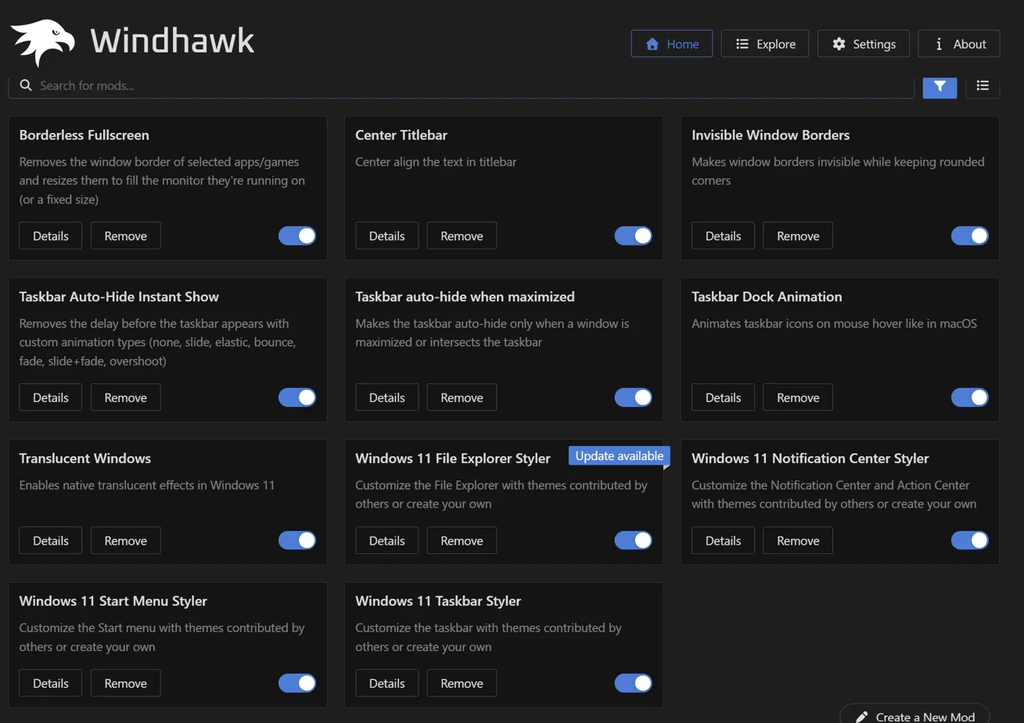
Going into this, I honestly expected the difference to be little to nothing. I run Windhawk all the time, plugged in or on battery, and I’ve never once traced lag back to a mod. Whenever my laptop has felt slow it’s been RAM filling up from something else, and Windhawk barely touches that. But I’d never actually measured it, so I figured I’d go do that. Down below are the mods I had enabled.
Does Windhawk Affect Performance? The Short Answer
So does Windhawk affect performance enough that you’d notice? For most of you guys, no. Windhawk mods are small bits of code that run inside programs you already have open, mostly Explorer, which draws your taskbar, Start menu and File Explorer. They change how those programs look or behave, and once they’ve done that they mostly sit there doing nothing until you interact with whatever they changed.
Here’s everything I measured, in one place:
| Test | Windhawk off | All 11 mods on | Difference |
|---|---|---|---|
| Cyberpunk 2077 average FPS (2 runs each) | 153.59 | 153.26 | -0.33 FPS (0.2%) |
| Cyberpunk 2077 min FPS (2 runs each) | 131.56 | 131.78 | +0.22 FPS |
| Idle battery drain (5 readings each) | 8.16 W | 8.70 W | +0.54 W (at most) |
| Explorer memory (restarted in both states) | 76.9 MB | 78.9 MB | +2.0 MB |
| Windhawk’s own processes | 0 MB | 4.9 MB | +4.9 MB |
I’ll go through how I got each one below, plus the couple of situations where Windhawk actually can slow things down.
My 11 mods (the setup I tested)
I didn’t build a special test setup, this is just what I actually run day to day:
- Windows 11 Taskbar Styler, Start Menu Styler, File Explorer Styler and Notification Center Styler
- Taskbar Dock Animation, Taskbar Auto-Hide Instant Show and Taskbar auto-hide when maximized
- Translucent Windows, Invisible Window Borders and Center Titlebar
- Borderless Fullscreen
That’s a heavier load than most people run. If you’ve only got 2 or 3 stylers going, your numbers will be smaller than mine. If you’re curious about which mods are most worth it, I went through them in my best Windhawk mods rundown.
How Windhawk Actually Uses Your System
So before any of the numbers make sense, it’s worth knowing which program Windhawk’s mods actually run in, because honestly I expected it to be Windhawk itself.
Windhawk has 2 parts. There’s the Windhawk app you see in your tray, and there’s the engine, a small DLL that gets loaded into other programs. According to the Windhawk wiki on injection targets, the engine gets injected into all processes except a predefined list of system-critical or known-incompatible ones. That sounds like a lot, but the engine on its own is mostly there to catch new programs starting up so mods can load early. A mod only actually loads into the specific processes it targets.
That’s why Task Manager is misleading here. On my laptop Windhawk shows up as 3 processes totaling 4.9 MB, which looks like nothing. But the real cost of a taskbar mod isn’t charged to Windhawk at all, it’s charged to Explorer, because that’s where the mod’s code is actually running.

Now the glass effects are their own thing. Every blur and translucency effect in a styler theme is drawn by the Desktop Window Manager (DWM), the part of Windows that composites every window on your screen. Microsoft’s DWM documentation describes it rendering windows from off-screen surfaces in video memory, so that work lands on your GPU, not on Explorer’s CPU usage. It also means DWM’s memory number in Task Manager is big on basically every Windows 11 machine whether you run Windhawk or not, so don’t blame Windhawk for that one.
Does Windhawk Affect Gaming Performance?
This is the one I cared about most, so I tested it properly. Does Windhawk affect gaming performance? In my testing, no.
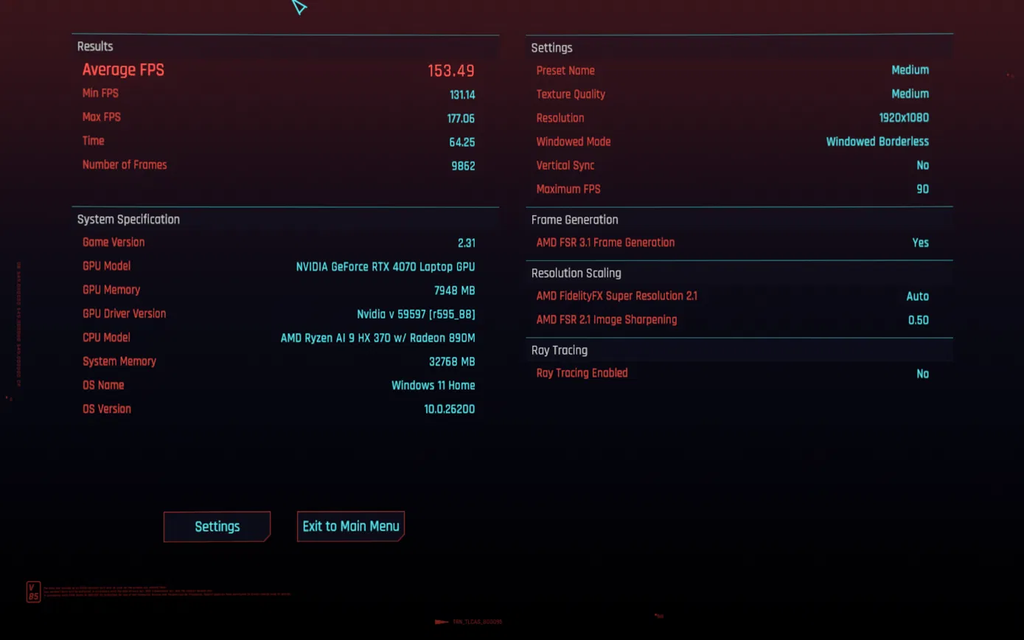
I used the built-in Cyberpunk 2077 benchmark because it plays the exact same scene every time and has no anti-cheat. I did 1 warm-up run and threw it away, since the first run builds the shader cache and always comes out slower. Then I alternated: Windhawk off, all 11 mods on, off, on. Alternating matters on a laptop, because the machine heats up over a session and that drags later runs down. If I’d done both “off” runs first, Windhawk would’ve been blamed for my laptop just getting warm. And “off” here means Windhawk fully exited from the tray, not just the mods toggled off, so there was nothing of Windhawk running at all.
| Run | Windhawk | Average FPS | Min FPS | Max FPS |
|---|---|---|---|---|
| 1 | Off | 153.68 | 131.98 | 175.88 |
| 2 | On (11 mods) | 152.83 | 131.20 | 176.39 |
| 3 | Off | 153.49 | 131.14 | 177.06 |
| 4 | On (11 mods) | 153.68 | 132.36 | 176.57 |
Now, run 2 on its own looks like Windhawk cost me almost a full frame. But run 4 with the exact same mods landed on 153.68, identical to my first “off” run. My 2 “on” runs were 0.85 FPS apart from each other, which is more than twice the 0.33 FPS gap between the on and off averages. So that gap is really just the benchmark being a little inconsistent from run to run, and funnily enough min FPS was actually slightly higher with mods on.
Off->
On->
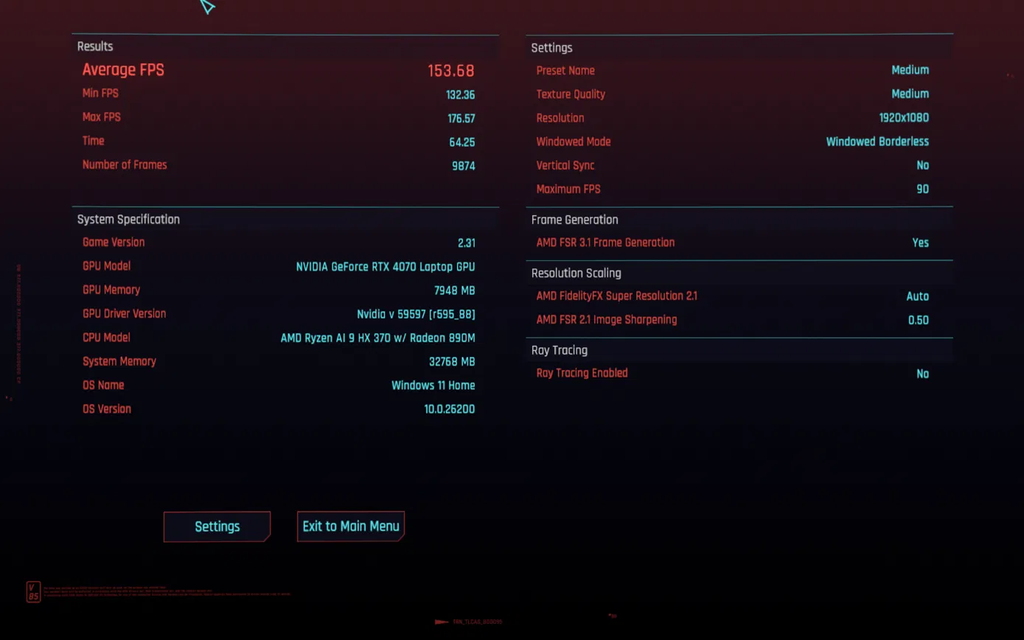
Settings were identical across all 4 runs: Medium preset, 1920×1080, Windowed Borderless, VSync off, a 90 FPS cap, AMD FSR 3.1 Frame Generation on and ray tracing off, on game version 2.31. Worth being upfront that with a cap and frame gen in play, a very small cost could hide under the ceiling. But at under 1 FPS either way, it’s not something you’d ever feel.
Why most games never even see Windhawk
Honestly the reason is pretty simple, almost none of my mods target games at all. The stylers, the dock animation and the auto-hide mods all live in Explorer and the shell, so while Cyberpunk is running they’re not doing anything to it. On top of that, Windhawk ships with a default exclusion list that keeps its engine out of a bunch of well-known games completely, and you can see or edit it under Settings > Advanced settings > More advanced settings.
The one exception in my list is Borderless Fullscreen, which by design hooks into whatever games you add to it. And Cyberpunk is on my Borderless Fullscreen list, so in my test Windhawk wasn’t just sitting in the background, it had a mod actively hooked into the game the entire time. That’s the worst case for gaming, and it still landed inside the run-to-run noise. If a mod running inside the game itself didn’t move FPS, the stylers living in Explorer definitely aren’t going to.
Separate from performance, if you play anything with kernel-level anti-cheat (Valorant, or games running Easy Anti-Cheat or BattlEye), close Windhawk first. That one’s about keeping your account from getting banned, and I went through it properly in is Windhawk safe.
Does Windhawk Use a Lot of Battery?
Since I run Windhawk on battery just as much as plugged in, does Windhawk use a lot of battery was the question I actually wanted answered for myself. To test it I needed a live discharge reading, and G-Helper shows exactly that, the current battery drain in watts, right in its main window. If you’ve never used it, it’s the lightweight ASUS control app I use instead of Armoury Crate (I compared the 2 in my G-Helper vs Armoury Crate breakdown), and I go through its battery life settings in G-Helper separately.
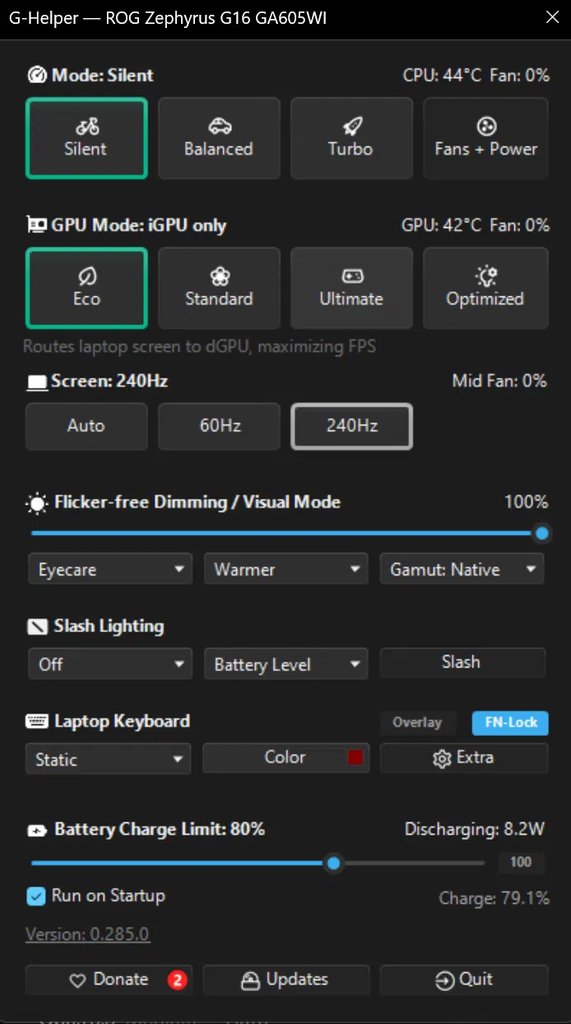
Here’s how I kept the test fair, because idle wattage jumps around a lot:
- Unplugged, with the laptop cooled down after gaming
- Silent mode and Eco GPU mode in G-Helper, so the RTX 4070 was fully off and not adding noise (more on what each of those does in my G-Helper GPU mode guide)
- 240 Hz at 50% screen brightness, with Slash Lighting and the keyboard backlight off
- Hands off, with a reading every 30 seconds, 5 readings per state
| State | Average idle drain | Range |
|---|---|---|
| Windhawk fully exited | 8.16 W | 7.8–8.6 W |
| All 11 mods on | 8.70 W | 8.0–9.6 W |
So with all 11 mods on, my laptop averaged about half a watt more, roughly 6–7% on top of an already low idle drain. I’d treat that as the most it could be, for 2 reasons. Even with Windhawk off and my hands off the keyboard, the readings moved around by almost a full watt, which is just Windows doing background work. And the “on” readings climbed steadily the whole time, from 8.0 to 9.6 W, which looks more like the laptop drifting upward than a fixed cost Windhawk adds. So don’t trust a single screenshot of your battery drain.
Worth knowing, the glass effects themselves can cost a little battery in a way that has nothing to do with Windhawk’s code. Transparency means the GPU is compositing more layers, and if you’re on an OLED like me, a bright, see-through theme lights up more pixels than a dark solid taskbar does. So does Windhawk use a lot of battery? The app no, but a heavy glass theme on an OLED can nudge it.
Does Windhawk Use a Lot of RAM?
Short version, no. Does Windhawk use a lot of RAM? Windhawk’s own processes sit at 4.9 MB on my machine. The real cost lives inside Explorer, so that’s what I measured.
To make it fair, I restarted Explorer in both states and read explorer.exe on the Details tab in Task Manager. With Windhawk fully exited, a fresh Explorer sat at 76.9 MB. With all 11 mods on and Explorer restarted, it came back at 78.9 MB, so about 2 MB. A couple of minutes later, after I’d been clicking around, it had crept up to 82.9 MB, which Explorer does on its own the more you use it.
| State | explorer.exe memory |
|---|---|
| Windhawk exited, Explorer restarted | 76.9 MB |
| All 11 mods on, Explorer restarted | 78.9 MB |
| All 11 mods on, a few minutes later | 82.9 MB |
| Long session, no restart | 214 MB |

I’ll be upfront: this corrects a number I’ve published before. In an earlier test with 9 mods I had Explorer at 118.8 MB with mods on versus 85.5 MB with mods off, and called it about 33 MB. The problem is that the 118.8 MB reading was an Explorer that had been running for a long time, while the 85.5 MB one was freshly restarted. Explorer grows on its own over a session, which you can see from the 214 MB reading in the table, so most of that 33 MB was Explorer building up over the session. Restarting Explorer in both states is the only way to get a fair number, and done that way it’s about 2 MB.
So does Windhawk use a lot of RAM? A few MB on top of a 4.9 MB app is nothing, even on an 8 GB laptop. That lines up with my own experience too: the only slowdowns I’ve had came from RAM filling up from other apps.
Does Windhawk Slow Down PC Day to Day?
Does Windhawk slow down PC use in general, outside of games? Sitting idle, the stylers aren’t doing anything, they changed how Explorer draws things when they loaded and that’s it. The one type of mod that does work continuously while you use it is animation, and in my list that’s Taskbar Dock Animation, which scales your icons as your cursor moves across the taskbar.
That work only happens while your cursor is actually moving over the taskbar. The rest of the time the mod is idle, which is why it didn’t show up in my battery or gaming numbers. If you’re on a weak laptop and want to squeeze out every bit, animation mods are the first ones I’d turn off, since they’re the only kind doing anything while you use your PC.
The Explorer restart isn’t lag
A lot of people mistake this one for Windhawk slowing their PC down. When you enable some mods or change their settings, Explorer restarts so the mod can load, and for a second or 2 your taskbar just disappears. It comes back on its own. It only happens when you change something, not while you’re just using your laptop, so it isn’t costing you anything after that. It’s definitely a bit jarring the first time you see it though, so just know it’s normal.
When Windhawk Can Actually Cause Lag
So does Windhawk affect performance ever? It can, it’s just usually not the app itself causing it. The real-world cases I’ve seen come down to a specific mod misbehaving or 2 mods fighting each other.
There’s a good example on GitHub where a user reported Edge lagging badly with Windhawk open while Windhawk’s own CPU, RAM, disk and network usage all looked tiny. The only mod they had enabled was Vertical Taskbar for Windows 11, and the lag went away when they exited Windhawk. That’s pretty much how it goes every time, Task Manager says Windhawk is fine because the actual problem is a mod running inside some other program.
I’ve had a version of this myself, 2 animation mods both going for my taskbar at once, which made it open in slow motion. Toggling one off fixed it instantly. If something feels sluggish after installing mods, here’s how I’d find the culprit:
- Open Windhawk and go to the Home tab with your installed mods.
- Toggle off the most recently installed or updated mod.
- Use your PC for a minute. If it’s fine, that mod was it. If not, toggle the next one off and repeat.
- If everything’s off and it’s still slow, right-click the tray icon and click Exit. If the problem stays even with Windhawk fully closed, Windhawk isn’t the cause.
Toggling off keeps all your settings, so there’s no reason to uninstall Windhawk while you’re testing. If mods aren’t applying at all rather than running slow, that’s a different problem, and my Windhawk not working guide covers the usual causes.
How Much Does Windhawk Affect Performance on Low-End PCs?
My G16 is a strong laptop, so if you’re on something weaker and asking does Windhawk affect performance more for you, that’s a fair question. The FPS result should hold up, since even with Borderless Fullscreen hooked into Cyberpunk it didn’t move. RAM is the one people worry about on 8 GB machines, but at a few MB for 11 mods it isn’t what’s going to push you over. If your PC is already struggling, run fewer stylers rather than skipping Windhawk entirely, and drop animation mods first since they’re the only ones doing work while you use your PC.
If you haven’t set it up yet, my guide on how to install Windhawk takes about 2 minutes and covers the installer and winget routes. The official site is windhawk.net, and I’d download it from there and nowhere else.
Windhawk Performance FAQ
Does Windhawk need to run in the background?
Yes. Mods only apply while Windhawk is running, so if you exit it from the tray, every mod stops and your desktop goes back to stock. That’s also why “Windhawk off” in my tests means fully exited, not just the window closed.
Is Windhawk heavy?
No. The app itself was 4.9 MB across 3 processes on my laptop. Most of the real cost is inside Explorer, and in my testing it didn’t move game FPS at all.
Does Windhawk affect performance at startup?
Does Windhawk affect performance when your laptop boots? I didn’t time boot for this post, so I’m not going to give you a number. Day to day, I haven’t noticed my G16 starting any slower with it set to run on startup.
Which Windhawk mods use the most resources?
Animation mods, because they do work every time you move your cursor over the thing they animate. Stylers do their work once when they load and then sit idle. Mods that hook into games, like Borderless Fullscreen, are the only ones that touch game processes directly.
So does Windhawk affect performance? My prediction of “little to nothing” held up: nothing in games, about 2 MB of RAM, and half a watt on battery at the very most. If you’ve measured something different on your own setup, drop your mod count, your RAM and what you saw in the comments, I’d genuinely like to know if a specific mod is costing people more than mine did.