Is Windhawk Safe? What It Actually Does to Your PC
So you’re sitting there about to install Windhawk, and something about a program that reaches into Windows and changes how it behaves is making you pause. That’s fair, and it’s the right instinct to have. The short version is that Windhawk is safe, but “is Windhawk safe” is one of those questions where the one-word answer is basically useless, because what it does to your system genuinely does look like something you’d want to be suspicious of.
Now I’ve had it running on my ASUS Zephyrus G16 for a couple of months now on Windows 11 25H2 (build 26200.9168), with 9 mods going at any one time. So I’ll go through what’s actually happening under the hood, why your antivirus might throw a fit about it, what the real risk is (it’s not the one most people worry about), and the one situation where I’d tell you to be careful.
Is Windhawk Safe? The Short Answer
Yes. Is Windhawk safe for the average person who just wants a nicer taskbar? Absolutely, with 2 caveats that are worth understanding rather than just nodding along to.
The app itself is about as trustworthy as free software gets. It’s open source, it’s been around for years, and it’s made by a developer with a track record. Nothing it does is hidden from you.
The caveats are that the mods are a separate question from the app, and that there’s one scenario involving games where I’d genuinely think twice. Both of those get their own section below, because they’re the parts nobody actually explains properly.
What Windhawk Actually Does to Windows
Here’s the part that matters, and honestly it’s the thing that answers about 80% of the worry people have.
Injection and hooking, without the jargon
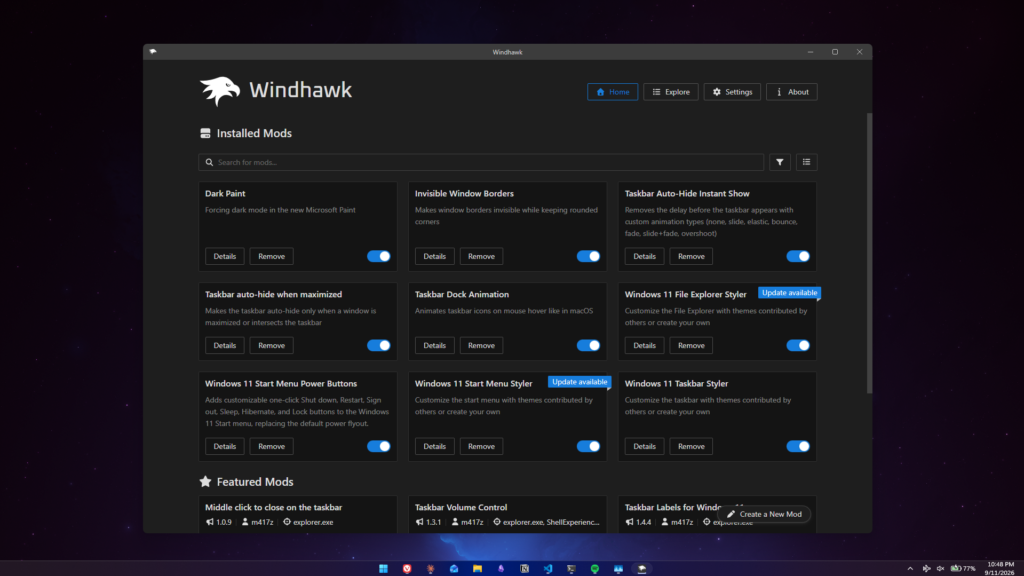
Windhawk works by injecting code into programs that are already running. That’s the whole mechanism. It loads its engine into a program, then loads whichever mods you’ve installed that target that specific program. Most of the time that program is explorer.exe, which is what draws your taskbar, your Start menu, and File Explorer.
That’s it. There’s no clever trick beyond that, and the developer documents the whole approach openly — the GitHub repo links straight out to a technical write-up on how the global injection and hooking works, which is not something you’d publish if you were hiding anything.
Now, here’s why that matters for the safety question. Injecting code into a running process is also exactly what a big chunk of real malware does. Your antivirus only sees the behavior, so it can’t tell Windhawk apart from malware doing the same thing.
Why nothing on your disk gets changed
The flip side of the injection approach, and the reason I’m comfortable recommending it, is that nothing on your disk is modified or replaced. Your actual Windows files sit there untouched. The changes only exist in memory while the program is running.
That’s a much bigger deal than it sounds. Tools that customize Windows by patching or swapping out system files leave you with a system that’s genuinely been altered, and backing that out cleanly is a whole thing. With Windhawk, you toggle a mod off and you’re back to stock instantly, no cleanup, no leftovers. Same goes for the app itself — uninstall it and every mod stops applying, because there was never anything to undo.
Is Windhawk a Virus? Why Your Antivirus Flags It
No, it isn’t. “Is Windhawk a virus” has to be the most googled thing about this whole app, and if your antivirus threw a fit at you then I completely get why you’d be asking. But it wasn’t being stupid either, and I’d rather explain that properly than just tell you to click ignore.
Go back to the injection thing above. Your scanner watched an unknown program load code into explorer.exe and flagged it, which is genuinely what you’d want your antivirus to do if the program had been something nastier. The scanner saw the right behavior, it just can’t know the program doing it is harmless.
I’ll be upfront here: my own install went through completely clean, not a peep out of any scanner. But it happens often enough to plenty of people that you’re better off knowing why than just being told to click ignore.
“Windhawk blocked for your protection” and the SmartScreen prompt
The more common thing you’ll run into is Windows itself blocking it. You’ll get a SmartScreen box telling you Windhawk was blocked for your protection, or a “Windows protected your PC” screen with the run button hidden behind a “More info” link.
That one isn’t a malware detection in any sense. SmartScreen throws that at software it hasn’t seen enough downloads of to have built up a reputation, and plenty of perfectly fine niche utilities trip it. Click More info, then Run anyway, and you’re through.
Whitelisting it without gutting your antivirus
If your scanner is the thing complaining and it won’t let up, the fix is to whitelist the specific Windhawk process and nothing more. And if Windhawk installed fine but your mods just aren’t applying, a scanner quietly blocking the engine from loading is one of the most common reasons, which I cover along with the other fixes in my guide on Windhawk not working.
What I’d really warn you off is the advice you’ll see thrown around of just switching real-time protection off, or excluding your entire C: drive to make the popup go away. Don’t do that. You’d be turning off your antivirus for your whole machine to solve a problem with one program, which is a wildly bad trade.
The rule I actually stick to is simpler than any of this though: download it from windhawk.net or through winget, and nowhere else. A random Windhawk_Setup_FREE_v2.exe off some download aggregator is a completely different conversation about risk, and no amount of “but Windhawk is open source” applies to a file you got from a site that wraps installers in junk. If you haven’t installed it yet, my guide on how to install Windhawk covers both of the legitimate routes.
Is Windhawk Open Source, and Does That Actually Matter?
So, is Windhawk open source? Yes, fully, under GPL-3.0 on GitHub. But I want to push back slightly on how this gets used in these conversations, because “it’s open source” gets thrown around like it settles things and it really doesn’t on its own.
Open source means anyone can inspect the code, but that doesn’t guarantee anyone has. Plenty of open source projects have had problems sitting in them for years with the source sitting right there in public the whole time.
What makes it meaningful in this particular case is the stuff around it. The project has about 9,000 stars and a couple hundred forks, so there are genuinely eyes on it. It’s built by Michael Maltsev, the same developer behind 7+ Taskbar Tweaker, which is a tool that’s been around the Windows customization scene for years. And the injection method that would be the scary part if it were hidden is instead written up and published by the developer himself.
So I trust it because of all of that together.
Are the Mods Safe? The Part People Skip
So this is the part most people skip straight past, and honestly it’s the thing most likely to actually go wrong on you.
Windhawk being open source and reviewed doesn’t mean every single mod on the marketplace gets held to that same standard. Mods are submitted by community authors and they do go through a review before they land in the marketplace, but at the end of the day you’re running third-party code inside explorer.exe. The app and the mods are 2 different trust questions.
What’s worth checking before you enable anything
I’ll be straight with you about my own habits here, because I think the honest version is more useful than a checklist I don’t follow.
When I started out I checked everything. Then I noticed that the mods that get popular mostly got popular because they’re solid, and that a big share of them come from the same small handful of developers. So I stopped checking every single one, and I’d guess most of you will end up doing the same once you’ve been at it a while.
Where I’d still genuinely tell you to slow down is on the less-used stuff. If you’re about to install some obscure mod with barely any downloads and nothing written about it anywhere, that’s the moment to look before you leap:
- Check which target processes the mod lists. A taskbar mod has no business reaching into anything outside Explorer, and that list is right there in the app.
- Take a look at the author and whether they’ve got other mods people are using.
- Read the source. Every mod’s code is viewable directly inside Windhawk, so you don’t even need to go to GitHub for it.
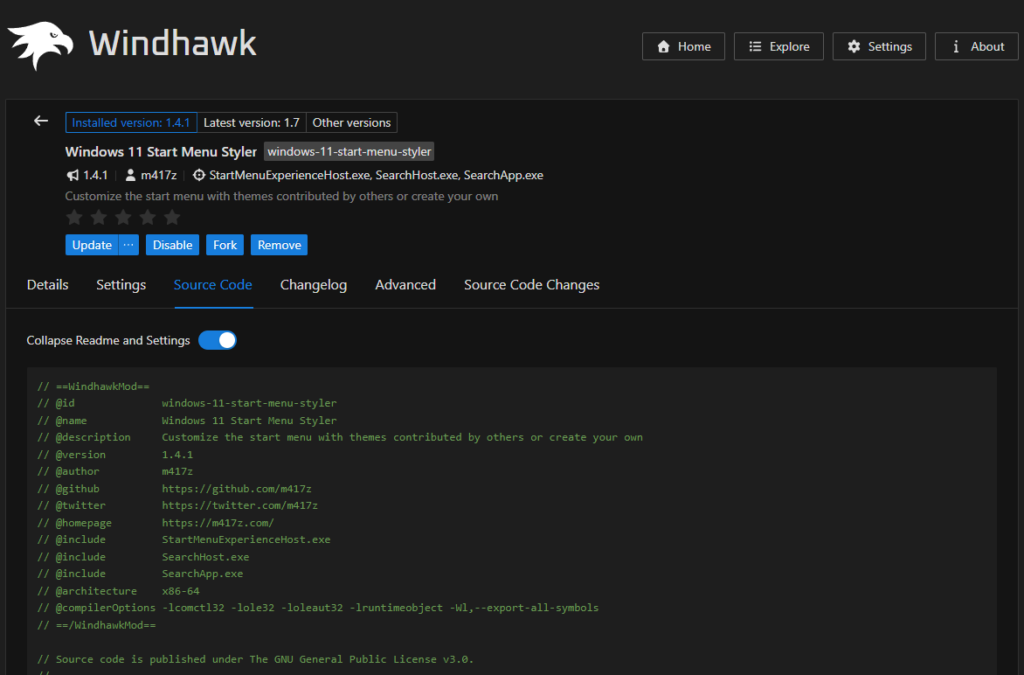
Install mods one at a time as well. Not for safety exactly, more because it saves you a headache, which brings me to the only thing that’s actually gone wrong for me.
Nothing has ever broken on my machine, no crashes, no dead taskbar, nothing like that. What I did run into is 2 mods fighting over the same thing. I had a couple of animation mods both going for my taskbar at once, and the result was my taskbar opening in slow motion. Nothing was damaged and toggling one off fixed it immediately, but if I’d installed 5 mods in one go I’d have had no idea which one to blame. That’s the thing most likely to go wrong with Windhawk, 2 mods conflicting. I go through which combinations caused me trouble in my rundown of the best Windhawk mods.
Is Windhawk bloatware? What it costs you sitting idle
Short answer: no, but the number you’d naturally go looking for is misleading and I want to show you why.
Open Task Manager, find windhawk.exe, and it’ll show you about 1 MB. Which looks fantastic until you remember how the thing works. Windhawk’s engine gets loaded into the programs it’s modding, so most of what it costs you isn’t charged to Windhawk at all, it’s charged to whatever it’s injected into. Mainly Explorer.
I originally measured this here with 9 mods and got about 33 MB, but that test compared an Explorer that had been running for hours against a freshly restarted one, and Explorer grows on its own over a session. So I redid it properly with 11 mods, restarting Explorer in both states, and the real difference came out to about 2 MB. The full test, along with battery drain and Cyberpunk benchmarks with Windhawk on and off, is in my breakdown of does Windhawk affect performance.
So, is Windhawk bloatware? Not by any reasonable use of the word. It’s doing real work for what it costs you, which is more than I can say for half the stuff ASUS ships preinstalled — Armoury Crate being the obvious one, which I pulled off this laptop entirely and wrote about in my G-Helper vs Armoury Crate comparison.
Can Windhawk Get You Banned?
So can Windhawk get you banned? This is the one where I’d actually tell you to pay attention, and going by what people are searching for, it’s the question that comes up more than any of the others.
Kernel-level anti-cheat — Vanguard in Valorant, Easy Anti-Cheat, BattlEye — exists specifically to spot code being injected into running processes. That is exactly what Windhawk does all day. The anti-cheat isn’t going to weigh up that yours is a taskbar clock mod rather than an aimbot, it just sees an unknown DLL going somewhere it shouldn’t.
Windhawk does ship with a default exclusion list that keeps it away from a lot of game processes, and that’s almost certainly why I’ve gotten away with it. But it’s a default, and defaults shift with updates.
Is Windhawk safe for gaming?
Here’s the part I can actually speak to. I’ve played Valorant on this laptop with Windhawk running the whole time, never closed it once, and nothing came of it. Vanguard is about as aggressive as kernel-level anti-cheat gets, so if anything was going to trip over Windhawk sitting in the background, that’s the one that would have done it.
That’s still one person on one account though, and Riot can change what Vanguard flags whenever they feel like it. An exclusion list that’s fine today isn’t a promise about what happens after the next patch, so I wouldn’t read my clean run as proof it’s fine forever.
So even with my own clean run behind it, what I’d recommend, and what I’d tell a friend, is to close Windhawk before you launch anything with kernel-level anti-cheat attached, and open it back up when you’re done. It takes 2 seconds, you lose nothing by doing it, and the downside if it ever does go wrong is a banned account you’re not getting back. That’s a terrible trade to take on for a slightly nicer taskbar.
Worth knowing that VAC games are a different story. VAC doesn’t work at the kernel level the way the others do, so the risk conversation there isn’t the same one.
Windhawk Safety at a Glance
So, is Windhawk safe once you add all of that up? Here’s everything above packed into one table, with what I’d actually do about each one.
| Concern | Actual risk | What to do |
|---|---|---|
| Antivirus flags the installer | Low — known false-positive pattern from code injection | Confirm you downloaded from windhawk.net, then whitelist the Windhawk process only |
| “Blocked for your protection” SmartScreen | None — reputation warning, not a detection | More info, then Run anyway |
| System files being modified | None — nothing is written to disk | No action needed |
| A bad mod breaking Explorer | Low to moderate | Install one at a time, toggle off to revert instantly |
| 2 mods conflicting | Moderate, and the most likely thing to happen | Toggle the newest one off first |
| Anti-cheat ban | Real, but easily avoided | Close Windhawk before kernel-level anti-cheat games |
| RAM overhead | Very low — about 2 MB in Explorer with 11 mods | No action needed |
Windhawk Safety FAQ
Is Windhawk safe to use every day?
Yeah, and that’s coming from someone who’s had it running constantly for a couple of months on the machine I actually work on, with 9 mods going the whole time. Day to day, is Windhawk safe comes down far more to which mods you decide to install than it does to the app sitting underneath them.
Can Windhawk break Windows?
Not permanently, no. The worst realistic outcome is a mod misbehaving and making Explorer act strangely, which you fix by toggling that mod off, and if Explorer is properly stuck you restart it from Task Manager or just sign out and back in. Because nothing is ever written to your system files, there’s no state left behind to repair.
Is Windhawk safe for Windows 10?
Yes, it runs on both Windows 10 and 11 and the safety picture is completely identical on either. The thing to watch on Windows 10 is that individual mods list their own supported builds, and plenty of the popular ones are written specifically for the Windows 11 taskbar. Those won’t do any harm on Windows 10, they just won’t do anything at all.
Can Windhawk be trusted?
On the evidence, yes. Open source under GPL-3.0, a developer with a long history in Windows customization, an injection method that’s publicly documented rather than obscured, and thousands of people running it. The part I’d keep separate in your head is the mods, since those are community-submitted and reviewed to a different standard than the app itself.
Can I run Windhawk without admin rights?
No, it needs admin to install and to inject into processes, which is unavoidable given what it does. If you’re on a work or school laptop where you don’t have admin, that’s your answer, and honestly I wouldn’t be trying to get around it on a machine somebody else manages anyway.
The 2 Things I’d Take Away
So, is Windhawk safe? Yeah, and I’m comfortable saying it because everything it does can be undone. Nothing gets written to your disk, so the worst case is always just toggling something off.
The 2 things I’d take away from all this are that the mods deserve more skepticism than the app does, particularly the obscure ones nobody’s talking about, and that the whole can Windhawk get you banned question is the one genuine risk worth changing your behavior over.
If you don’t have it installed yet, my walkthrough on how to install Windhawk covers the installer and the winget route and getting your first mods running. Once you’re set up, the best Windhawk mods rundown has the 9 I keep enabled plus the 6 I turned off, and if it’s specifically the taskbar you’re after then my Windows 11 Taskbar Styler guide goes deep on that one. There are matching guides for the Start menu and File Explorer versions as well, since all 3 work the same way.
If your antivirus flagged Windhawk and you’re not sure what to make of it, drop the antivirus name and what it called the detection in the comments and I’ll take a look.